Area Charts
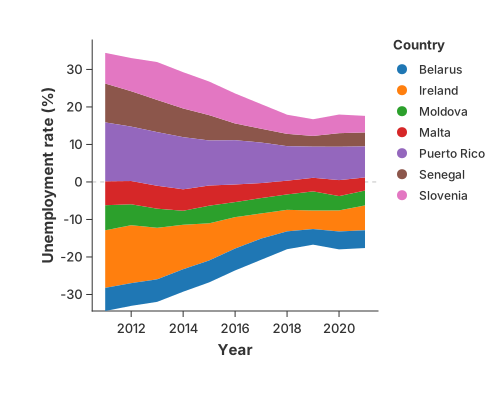
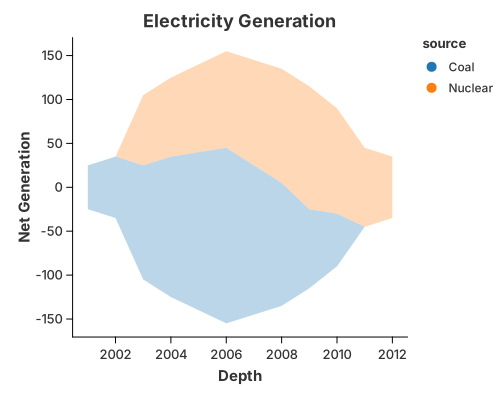
An area fills the region between a line and its baseline. Adding a colour field stacks the series; changing the stack baseline yields the streamgraph.
Area chart
use charton::prelude::*;
use std::error::Error;

fn main() -> Result<(), Box<dyn Error>> {
    // Create sample data similar to the Iowa electricity dataset
    let depth = vec![
        2001, 2002, 2003, 2004, 2005, 2006, 2007, 2008, 2009, 2010, 2003, 2004, 2005, 2006, 2007,
        2008, 2009, 2010, 2011, 2012,
    ];
    let net_generation = vec![
        50.0, 70.0, 130.0, 160.0, 180.0, 200.0, 170.0, 140.0, 90.0, 60.0, 80.0, 90.0, 100.0, 110.0,
        120.0, 130.0, 140.0, 120.0, 90.0, 70.0,
    ];
    let source = vec![
        "Coal", "Coal", "Coal", "Coal", "Coal", "Coal", "Coal", "Coal", "Coal", "Coal", "Nuclear",
        "Nuclear", "Nuclear", "Nuclear", "Nuclear", "Nuclear", "Nuclear", "Nuclear", "Nuclear",
        "Nuclear",
    ];

    // Create an area chart
    let area_chart = chart!(depth, net_generation, source)?
        .mark_area()?
        .configure_area(|a| a.with_opacity(0.3).with_stroke("black"))
        .encode((
            alt::x("depth"),
            alt::y("net_generation").with_stack("center"),
            alt::color("source"),
        ))?;

    // Create a layered chart for the area
    area_chart
        .with_title("Electricity Generation")
        .with_x_label("Depth")
        .with_y_label("Net Generation")
        .save("docs/src/images/area.svg")?;

    Ok(())
}
Gaps
A missing x or y opens the area at that point instead of bridging it. See
Missing Values & Gaps.
Simple Stacked Area Chart
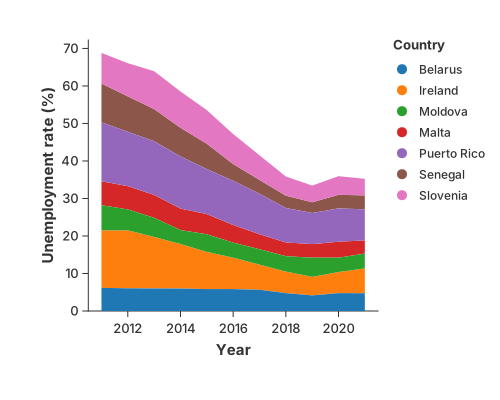
Adding a color field to area chart creates stacked area chart by default. For example, here we split the area chart by country by setting stack to "stacked".
use charton::prelude::*;
use std::error::Error;

fn main() -> Result<(), Box<dyn Error>> {
    // Create sample data similar to the Iowa electricity dataset
    let ds = load_dataset("unemployment")?;
    println!("{:?}", ds);
    // Create an area chart
    let area_chart = chart!(ds)?.mark_area()?.encode((
        alt::x("Year"),
        alt::y("Unemployment rate (%)").with_stack("stacked"),
        alt::color("Country"),
    ))?;

    // Create a layered chart for the area
    area_chart.save("docs/src/images/simple_stacked_area.svg")?;

    Ok(())
}
Normalized Stacked Area Chart
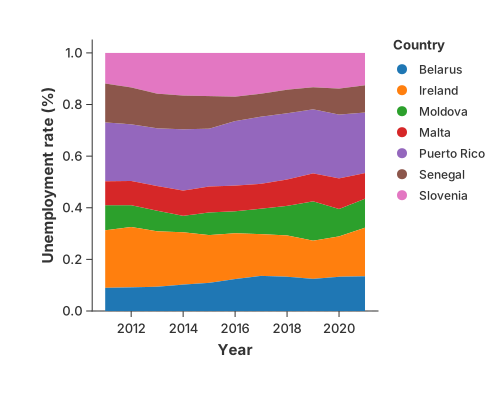
You can also create a normalized stacked area chart by setting stack to "normalize" in the encoding channel. Here we can easily see the percentage of unemployment across countries.
use charton::prelude::*;
use std::error::Error;

fn main() -> Result<(), Box<dyn Error>> {
    let ds = load_dataset("unemployment")?;
    println!("{:?}", ds.tail(5));
    let area_chart = chart!(ds)?.mark_area()?.encode((
        alt::x("Year"),
        alt::y("Unemployment rate (%)").with_stack("normalize"),
        alt::color("Country"),
    ))?;

    area_chart.save("docs/src/images/normalized_stacked_area.svg")?;

    Ok(())
}
Steamgraph
We can also shift the stacked area chart’s baseline to center and produces a streamgraph by setting stack to "center" in the encoding channel.
use charton::prelude::*;
use std::error::Error;

fn main() -> Result<(), Box<dyn Error>> {
    let ds = load_dataset("unemployment")?;
    println!("{:?}", ds);
    let area_chart = Chart::build(&ds)?.mark_area()?.encode((
        alt::x("Year"),
        alt::y("Unemployment rate (%)").with_stack("center"),
        alt::color("Country"),
    ))?;

    area_chart.save("docs/src/images/steamgraph.svg")?;

    Ok(())
}