Strip & Rug Plots
A tick is a short line; many ticks along an axis read as density.
Strip Plot
The following example uses tick marks to show the distribution of sepal width in the Iris dataset. By adding a y field (categorical data), a strip plot is created to show the distribution of sepal width across different species.
use charton::prelude::*;
use std::error::Error;

fn main() -> Result<(), Box<dyn Error>> {
    let ds = load_dataset("iris")?;

    let chart = Chart::build(&ds)?.mark_tick()?.encode((
        alt::x("sepal_width"),
        alt::y("species"),
        alt::color("species"),
    ))?;

    chart.save("docs/src/images/strip.svg")?;

    Ok(())
}
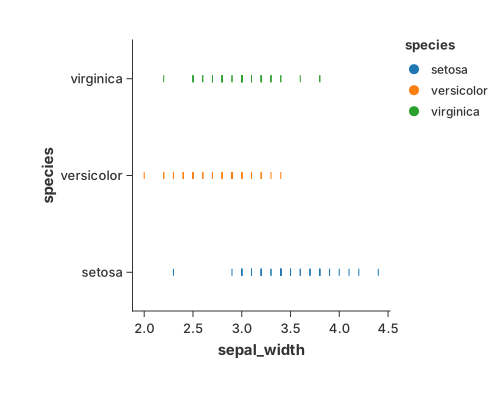
When there only one category or color encoding is absent, it degeneates to a "rug" of lines along the bottom.
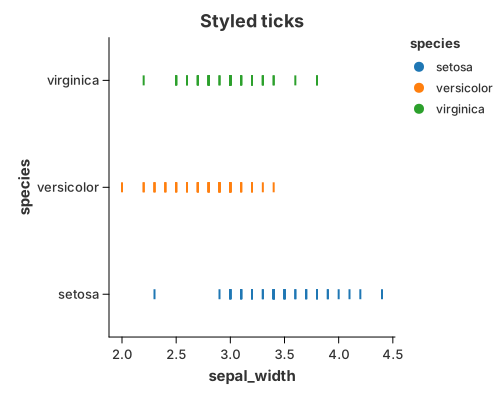
You can precisely control the visual weight of the ticks using configure_tick. This is useful for balancing the "density" look of the chart.
//! Styling ticks.
//!
//! `configure_tick` controls the visual weight of the marks: thickness, band
//! size and colour. This is useful for balancing a dense strip plot.

use charton::prelude::*;
use std::error::Error;

fn main() -> Result<(), Box<dyn Error>> {
    let ds = load_dataset("iris")?;

    Chart::build(&ds)?
        .mark_tick()?
        .configure_tick(|m| {
            m.with_thickness(2.0)
                .with_band_size(10.0)
                .with_color("blue")
        })
        .encode((
            alt::x("sepal_width"),
            alt::y("species"),
            alt::color("species"),
        ))?
        .with_title("Styled ticks")
        .save("docs/src/images/tick_style.svg")?;

    println!("Saved docs/src/images/tick_style.svg");
    Ok(())
}
Significance and Usage
-
Significance: Unlike a
point, atickemphasizes positional density. Because of its linear shape, overlapping ticks create a "barcode" effect that intuitively reveals where data points are most concentrated. -
Common Use Cases:
- Rug Plots: Often placed at the edges of scatter plots or histograms to show marginal distributions.
- Strip Plots: Used as an alternative to box plots when the dataset is small to medium-sized, allowing every individual data point to be seen.
- High-Performance Rendering: In Rust-based engines like
charton, rendering simple quads (ticks) is extremely efficient for visualizing millions of data points compared to complex shapes.