Bars, Ranges & Comparisons
This page covers value comparisons: bars and error bars, and the range recipes
built on the same pieces — a dumbbell, a lollipop, a range plot, a waterfall and
a candlestick. They are all ordinary layers, so they share one set of scales and
compose with .and(…).
Basic Bar with Error Bars
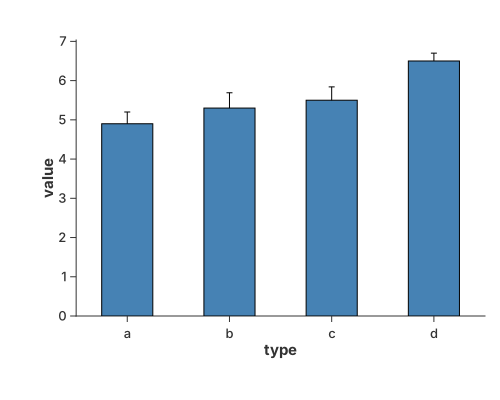
Error bars are essential for communicating the precision of your data. This example shows the most common use case: a bar chart where each bar is accompanied by a vertical error bar calculated from pre-defined standard deviation values.
Key Concept: We use transform_calculate to dynamically create value_min and value_max columns within the chart pipeline.
use charton::prelude::*;
use std::error::Error;

fn main() -> Result<(), Box<dyn Error>> {
    // Create sample data with x and y values
    let type1 = ["a", "b", "c", "d"];
    let value = [4.9, 5.3, 5.5, 6.5];
    let value_std = [0.3, 0.39, 0.34, 0.20];

    // Create error bar chart using transform_calculate to add min/max values
    let errorbar = chart!(type1, value, value_std)?
        // Use transform_calculate to create ymin and ymax columns based on fixed std values
        .transform_calculate("value_min", |row| {
            Some(row.val("value")? - row.val("value_std")?)
        })?
        .transform_calculate("value_max", |row| {
            Some(row.val("value")? + row.val("value_std")?)
        })?
        .mark_errorbar()?
        .encode((alt::x("type1"), alt::y("value_min"), alt::y2("value_max")))?;
    let bar = chart!(type1, value)?
        .mark_bar()?
        .encode((alt::x("type1"), alt::y("value")))?;

    // Create a layered chart and add the errorbar chart as a layer
    errorbar
        .and(bar)
        .with_y_label("value")
        .save("docs/src/images/bar_with_errorbar.svg")?;

    Ok(())
}
Grouped Bar with ErrorBar
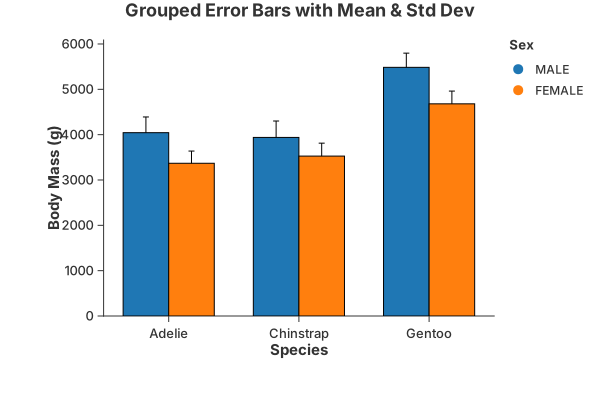
When multiple groups are present (mapped to color), Charton automatically applies "dodge" logic to ensure that both the bars and the error bars are aligned side-by-side for each category.
use charton::prelude::*;
use std::error::Error;

fn main() -> Result<(), Box<dyn Error>> {
    let ds = load_dataset("penguins")?;
    println!("{:?}", ds);

    // 2. Build the Error Bar layer
    let errorbar = chart!(&ds)?
        .mark_errorbar()?
        // Mapping 'Sex' to color triggers the dodge logic
        .encode((
            alt::x("Species"),
            alt::y("Body Mass (g)"),
            alt::color("Sex"),
        ))?;

    // 3. Add a Bar layer to see the alignment
    let bar = chart!(ds)?.mark_bar()?.encode((
        alt::x("Species"),
        alt::y("Body Mass (g)").with_aggregate("mean"),
        alt::color("Sex"),
    ))?;

    // 4. Create the multiple layered Chart
    errorbar
        .and(bar)
        .with_size(600, 400)
        .with_title("Grouped Error Bars with Mean & Std Dev")
        .save("docs/src/images/grouped_bar_with_errorbar_1.svg")?;

    Ok(())
}
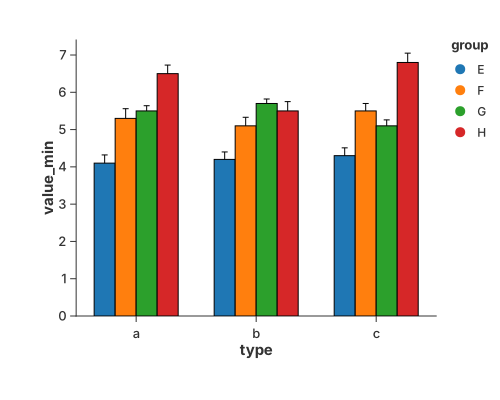
As an alternative approach, we demonstrate how to create a grouped error bar chart by manually defining the error boundaries using transform_calculate. While the previous one use automatic statistical aggregations, this method shows that the data generated through Charton's internal transformation pipeline is fully compatible across different layers. By calculating value_min and value_max within the errorbar layer, we ensure that the resulting dataset structure remains consistent with the mark_bar layer.
use charton::prelude::*;
use std::error::Error;

fn main() -> Result<(), Box<dyn Error>> {
    // Create sample data with x and y values
    let type1 = ["a", "a", "a", "a", "b", "b", "b", "b", "c", "c", "c", "c"];
    let value = [4.1, 5.3, 5.5, 6.5, 4.2, 5.1, 5.7, 5.5, 4.3, 5.5, 5.1, 6.8];
    let value_std = [
        0.22, 0.26, 0.14, 0.23, 0.2, 0.23, 0.12, 0.25, 0.21, 0.20, 0.16, 0.25,
    ];
    let group = ["E", "F", "G", "H", "E", "F", "G", "H", "E", "F", "G", "H"];

    // Create error bar chart using transform_calculate to add min/max values
    let errorbar = chart!(type1, value, value_std, group)?
        // Use transform_calculate to create ymin and ymax columns based on fixed std values
        .transform_calculate("value_min", |row| {
            Some(row.val("value")? - row.val("value_std")?)
        })?
        .transform_calculate("value_max", |row| {
            Some(row.val("value")? + row.val("value_std")?)
        })?
        .mark_errorbar()?
        .encode((
            alt::x("type1"),
            alt::y("value_min"),
            alt::y2("value_max"),
            alt::color("group"),
        ))?;

    // Create a bar chart
    let bar = chart!(type1, value, value_std, group)?
        .mark_bar()?
        .encode((alt::x("type1"), alt::y("value"), alt::color("group")))?;

    // Create a layered chart
    errorbar
        .and(bar)
        .save("docs/src/images/grouped_bar_with_errorbar_2.svg")?;

    Ok(())
}
Stacked bar
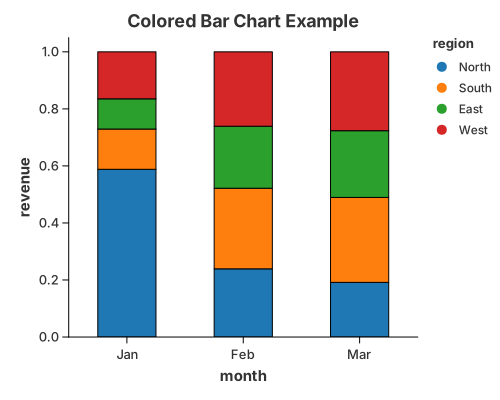
Segments stacked by a colour group; stack: "stacked" (the default for a
grouped bar).
use charton::prelude::*;
use std::error::Error;

fn main() -> Result<(), Box<dyn Error>> {
    let month = [
        "Jan", "Jan", "Jan", "Jan", "Feb", "Feb", "Feb", "Feb", "Mar", "Mar", "Mar", "Mar",
    ];
    let revenue = [
        500.0, 120.1, 90.0, 140.0, 110.0, 130.0, 100.0, 120.0, 90.0, 140.0, 110.0, 130.0,
    ];
    let region = [
        "North", "South", "East", "West", "North", "South", "East", "West", "North", "South",
        "East", "West",
    ];

    // Create a bar chart with color encoding
    chart!(month, revenue, region)?
        .mark_bar()?
        .configure_bar(|b| {
            b.with_stroke("black")
                .with_stroke_width(1.0)
                .with_width(0.5)
        })
        .encode((
            alt::x("month"),
            alt::y("revenue").with_normalize(true).with_stack("stacked"),
            alt::color("region"),
        ))?
        .with_title("Colored Bar Chart Example")
        .save("docs/src/images/stacked_bar.svg")?;

    Ok(())
}
Error bar on its own
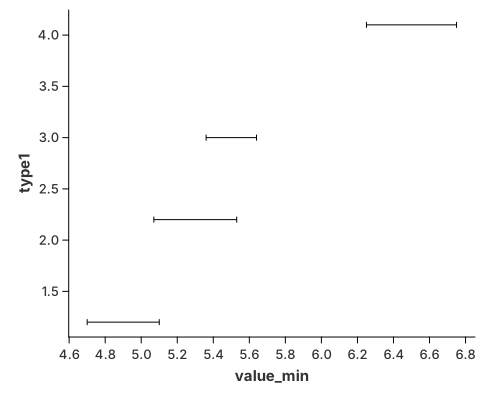
The interval geometry by itself, without a bar:
use charton::prelude::*;
use std::error::Error;

fn main() -> Result<(), Box<dyn Error>> {
    // Create sample data with x and y values
    let type1 = [1.2, 2.2, 3.0, 4.1];
    let value = [4.9, 5.3, 5.5, 6.5];
    let value_std = [0.2, 0.23, 0.14, 0.25];

    // Create error bar chart using transform_calculate to add min/max values
    chart!(type1, value, value_std)?
        // Use transform_calculate to create ymin and ymax columns based on fixed std values
        .transform_calculate("value_min", |row| {
            Some(row.val("value")? - row.val("value_std")?)
        })?
        .transform_calculate("value_max", |row| {
            Some(row.val("value")? + row.val("value_std")?)
        })?
        .mark_errorbar()?
        .encode((alt::x("type1"), alt::y("value_min"), alt::y2("value_max")))?
        .coord_flip()
        .save("docs/src/images/errorbar.svg")?;

    Ok(())
}
Dumbbell (connected dot)
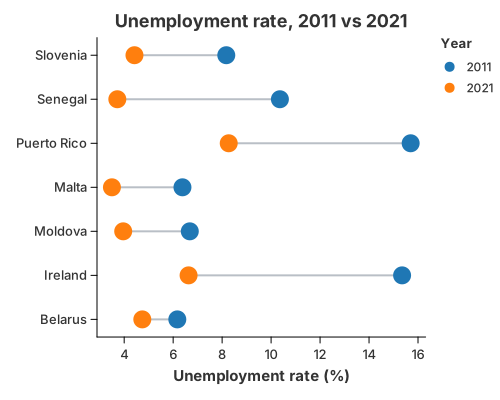
A dumbbell compares two values for each category — a before/after, an A/B, a min/max. Each row gets a dot at both values and a segment between them: the dot position shows the level, and the segment length shows how much changed.
It is a recipe, not a mark. mark_rule draws the connector from two wide columns
(y and y2); the dots come from a tidy table so the period can drive the
colour and produce a legend. coord_flip stands the categories up so the
segments run horizontally, and with_dodge(false) keeps the two ends on the
segment — a colour channel is otherwise a lane, which would push the periods
apart into two columns.
//! Dumbbell (connected dot) — two values per category, joined by a segment.
//!
//! A dumbbell is a recipe, not a mark. `mark_rule` draws the segment between the
//! two values and a `mark_point` layer marks each end; all layers share the
//! category and value scales, so they line up automatically. `coord_flip`
//! stands the categories up so the segments run horizontally.

use charton::prelude::*;
use std::error::Error;

fn main() -> Result<(), Box<dyn Error>> {
    // Unemployment rate (%), 2011 vs 2021, for seven countries.
    let country = [
        "Belarus",
        "Ireland",
        "Moldova",
        "Malta",
        "Puerto Rico",
        "Senegal",
        "Slovenia",
    ];
    let y2011 = [6.17, 15.35, 6.68, 6.38, 15.70, 10.36, 8.17];
    let y2021 = [4.74, 6.63, 3.96, 3.50, 8.27, 3.72, 4.42];

    // 1. The connector: one rule per country, from the 2011 value to the 2021
    //    value. The rule geometry reads `y` and `y2` from one wide row.
    let connector = chart!(country, y2011, y2021)?
        .mark_rule()?
        .configure_rule(|rule| rule.with_color("#b9bfc6").with_stroke_width(2.0))
        .encode((alt::x("country"), alt::y("y2011"), alt::y2("y2021")))?;

    // 2. The two ends: a tidy (long) table, one row per country and period, so
    //    the period can drive the colour and produce a legend.
    let countries_long: Vec<&str> = country.iter().chain(country.iter()).copied().collect();
    let periods: Vec<&str> = std::iter::repeat("2011")
        .take(7)
        .chain(std::iter::repeat("2021").take(7))
        .collect();
    let values: Vec<f64> = y2011.iter().chain(y2021.iter()).copied().collect();

    let ends = Dataset::new()
        .with_column("country", countries_long)?
        .with_column("period", periods)?
        .with_column("value", values)?;

    connector
        .and(
            chart!(&ends)?
                .mark_point()?
                // `with_dodge(false)` keeps both ends on the shared segment: a
                // colour channel is otherwise a *lane*, which would push the
                // two periods apart.
                .configure_point(|point| point.with_size(9.0).with_dodge(false))
                .encode((alt::x("country"), alt::y("value"), alt::color("period")))?,
        )
        .coord_flip()
        .with_title("Unemployment rate, 2011 vs 2021")
        .with_x_label("")
        .with_y_label("Unemployment rate (%)")
        .with_color_label("Year")
        .save("docs/src/images/dumbbell.svg")?;

    println!("Saved docs/src/images/dumbbell.svg");
    Ok(())
}
Lollipop and range
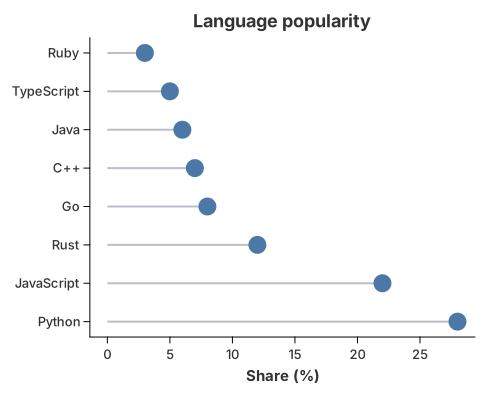
A bar with the fill thrown away: mark_rule draws the stem and mark_point
caps it. A range plot is the same rule with both ends away from the
baseline, and the dumbbell above is a range plot with two dots.
//! Lollipop — a bar with the fill thrown away.
//!
//! A recipe: `mark_rule` draws a thin stem from the baseline to each value and
//! `mark_point` caps it. Two ordinary geometries, no new mark. A *range plot*
//! is the same idea with both ends off the baseline (`y` to `y2`).

use charton::prelude::*;
use std::error::Error;

fn main() -> Result<(), Box<dyn Error>> {
    let language = [
        "Python",
        "JavaScript",
        "Rust",
        "Go",
        "C++",
        "Java",
        "TypeScript",
        "Ruby",
    ];
    let share = [28.0, 22.0, 12.0, 8.0, 7.0, 6.0, 5.0, 3.0];
    let base = [0.0; 8];

    let stems = chart!(language, share, base)?
        .mark_rule()?
        .configure_rule(|rule| rule.with_color("#b9bfc6").with_stroke_width(2.0))
        .encode((alt::x("language"), alt::y("base"), alt::y2("share")))?;

    let caps = chart!(language, share)?
        .mark_point()?
        .configure_point(|point| point.with_color("#4c78a8").with_size(9.0))
        .encode((alt::x("language"), alt::y("share")))?;

    stems
        .and(caps)
        .coord_flip()
        .with_title("Language popularity")
        .with_x_label("")
        .with_y_label("Share (%)")
        .save("docs/src/images/lollipop.svg")?;

    println!("Saved docs/src/images/lollipop.svg");
    Ok(())
}
Waterfall
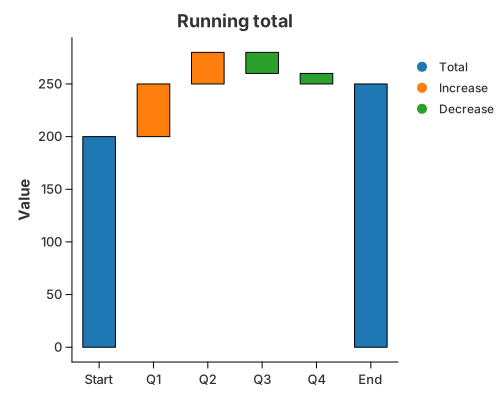
A running total as floating bars. transform_window with
WindowOnlyOp::CumulativeSum carries the total, and a y2 bound floats each
bar between the total before and after its step; colour splits increases
from decreases.
//! Waterfall — a running total shown as floating bars.
//!
//! Two public primitives do the work: `transform_window` with
//! `WindowOnlyOp::CumulativeSum` carries the running total, and `mark_bar` with
//! a `y2` bound draws each step as a bar that floats between the total *before*
//! and *after* it. The opening and closing **totals** are the same idea anchored
//! at zero (`base = 0`), so the picture needs one geometry, not two.

use charton::prelude::*;
use std::error::Error;

fn main() -> Result<(), Box<dyn Error>> {
    // Opening total, quarterly contributions, closing total.
    let step = ["Start", "Q1", "Q2", "Q3", "Q4", "End"];
    let delta = [200.0, 50.0, 30.0, -20.0, -10.0, 0.0];
    let kind = [
        "Total", "Increase", "Increase", "Decrease", "Decrease", "Total",
    ];

    chart!(step, delta, kind)?
        // The running total after each step ...
        .transform_window(WindowTransform::new(WindowFieldDef::new(
            "delta",
            WindowOnlyOp::CumulativeSum,
            "total",
        )))?
        // ... and the bar's lower edge: the total before the step, or zero for
        // the opening/closing total columns.
        .transform_calculate("base", |row| {
            if row.str("kind").as_deref() == Some("Total") {
                Some(0.0)
            } else {
                Some(row.val("total")? - row.val("delta")?)
            }
        })?
        .mark_bar()?
        .configure_bar(|bar| bar.with_width(0.6))
        .encode((
            alt::x("step"),
            alt::y("base"),
            alt::y2("total"),
            alt::color("kind"),
        ))?
        .with_title("Running total")
        .with_x_label("")
        .with_y_label("Value")
        .with_color_label("")
        .save("docs/src/images/waterfall.svg")?;

    println!("Saved docs/src/images/waterfall.svg");
    Ok(())
}
Candlestick
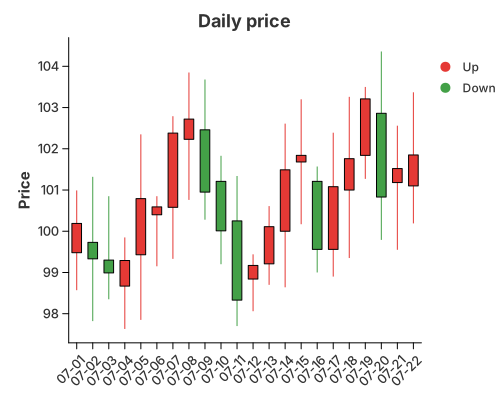
OHLC bars: mark_rule draws the high–low wick and a floating mark_bar (its
y2 bound) draws the open–close body, coloured by direction.
//! Candlestick — an OHLC bar per period.
//!
//! A recipe: `mark_rule` draws the high–low wick (`y` to `y2`) and `mark_bar`
//! with a `y2` bound draws the open–close body as a *floating* bar. Colour tells
//! an up day from a down day. The two layers share the category axis, so the
//! bodies sit exactly on their wicks.
//!
//! The prices are a seeded random walk, so the figure looks like a real price
//! series while still rendering identically every run.

use charton::prelude::*;
use std::error::Error;

fn main() -> Result<(), Box<dyn Error>> {
    // A tiny seeded LCG: deterministic, but with the run of a random walk.
    let mut seed: u64 = 0x9E37_79B9_7F4A_7C15;
    let mut noise = || {
        seed = seed
            .wrapping_mul(6364136223846793005)
            .wrapping_add(1442695040888963407);
        (seed >> 11) as f64 / (1u64 << 53) as f64 * 2.0 - 1.0
    };

    let days = 22;
    let mut open = Vec::with_capacity(days);
    let mut high = Vec::with_capacity(days);
    let mut low = Vec::with_capacity(days);
    let mut close = Vec::with_capacity(days);
    let round = |v: f64| (v * 100.0).round() / 100.0;
    let mut price = 100.0;

    for _ in 0..days {
        let o = price + noise() * 0.8; // gap from the previous close
        let c = o + noise() * 2.0 + (100.0 - o) * 0.08; // move, pulled toward 100
        let h = o.max(c) + noise().abs() * 1.5 + 0.2;
        let l = o.min(c) - noise().abs() * 1.5 - 0.2;
        open.push(round(o));
        close.push(round(c));
        high.push(round(h));
        low.push(round(l));
        price = c;
    }

    let day: Vec<String> = (1..=days).map(|d| format!("07-{d:02}")).collect();
    let direction: Vec<&str> = open
        .iter()
        .zip(close.iter())
        .map(|(o, c)| if c >= o { "Up" } else { "Down" })
        .collect();

    // A floating bar (a `y2` bound) does not force a zero baseline, so the price
    // axis stays on the traded range and the candles fill the panel.
    let wick = chart!(day, low, high, direction)?
        .mark_rule()?
        .configure_rule(|rule| rule.with_stroke_width(1.0))
        .encode((
            alt::x("day"),
            alt::y("low"),
            alt::y2("high"),
            alt::color("direction"),
        ))?;

    let body = chart!(day, open, close, direction)?
        .mark_bar()?
        .configure_bar(|bar| bar.with_width(0.6))
        .encode((
            alt::x("day"),
            alt::y("open"),
            alt::y2("close"),
            alt::color("direction"),
        ))?;

    wick.and(body)
        .configure_theme(|theme| {
            // Chinese-market convention: red for an up day, green for a down day.
            theme
                .with_palette(ColorPalette::from(vec!["#e53935", "#43a047"]))
                .with_x_tick_label_angle(-45.0)
        })
        .with_title("Daily price")
        .with_x_label("")
        .with_y_label("Price")
        .with_color_label("")
        .save("docs/src/images/candlestick.svg")?;

    println!("Saved docs/src/images/candlestick.svg");
    Ok(())
}